Maze Example
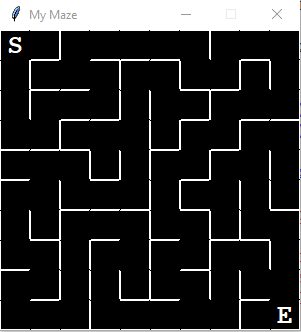
Please note, there is a bug in the code. There is a slight disconnect where walls meet. If possible, fix it.
Code
#!/usr/bin/python
# ====================================================================
# create a maze
#
# algorithm from: wikipedia.org/wiki/Maze_generation_algorithm
# ====================================================================
#
# Two of the ways to structure the code in this program are:
#
# a. Pre-calculate as much as possible before visiting each cell
# to create paths. This is more-or-less what I do in this code.
#
# b. Do as little pre-calculation as possible. Do most of the
# calculations while building the maze paths.
#
# --------------------------------------------------------------------
#
# This code uses three types of coordinates/list-indexes.
#
# 1. Cells are stored in a list.
# The cell index is [0 .. columns*rows-1]
#
# 2. Cells are also stored in a theoretical matrix of
# columns and rows.
# col values [0 .. columns-1]
# row values [0 .. rows-1]
#
# c. Cells also have Graphics window pixel Cartesian coordinates.
# They are the cell's upper-left corner (x0,y0) and lower-right
# corner (x1,y1).
# x0,x1 values [0 .. window_width-1] (pixels)
# y0,y1 values [0 .. window_height-1] (pixels)
#
# --------------------------------------------------------------------
#
# Cell Corners and Sides (Walls)
#
# (x0,y0) top (x1,y0)
# +----------+
# | |
# left | CELL | right
# | |
# | |
# +----------+
# (x0,y1) bottom (x1,y1)
#
# --------------------------------------------------------------------
#
# Adjacent Cells
# (neighbors)
#
# +-----------+
# | |
# | col,row-1 |
# | |
# +-----------+-----------+-----------+
# | | | |
# | col-1,row | col,row | col+1,row |
# | | | |
# +-----------+-----------+-----------+
# | |
# | col,row+1 |
# | |
# +-----------+
#
# --------------------------------------------------------------------
#
# Cartesian Coordinate System Graphics Window Coordinates
# (viewer is at +z infinity) (viewer is at +z infinity)
#
# +y (0,0)
# | +------------- +x
# | |
# | |
# | |
# | |
# +------------- +x +y
# (0,0)
#
# --------------------------------------------------------------------
#
# Algorithm
#
# 1. Choose an initial cell, mark it as visited and push
# it onto the stack
#
# 2. While the stack is not empty
#
# 1. Pop a cell from the stack and make it the
# current cell
#
# 2. If the current cell has any neighbors which have
# not been visited
#
# 1. Push the current cell onto the stack
#
# 2. Choose one of the unvisited neighbors
# (Randomly select a neighbor?)
#
# 3. Remove the wall(s) between the current cell and
# the chosen cell
#
# 4. Mark the chosen cell as visited and push it
# onto the stack
#
# ====================================================================
#
# FYI:
#
# Locate and modify the code near these comments
# a. (make this truly random when no longer testing)
# b. (remove this code when no longer testing)
#
# ====================================================================
import sys
import math
import time
import random
import graphics as gr
from enum import IntEnum
from dataclasses import dataclass
VERBOSE = False
# --------------------------------------------------------------------
# ---- each cell has four walls that are stored in a list. enums
# ---- are used to specify which wall when accessing the list.
# --------------------------------------------------------------------
class WALL(IntEnum):
TOP = 0
RIGHT = 1
BOTTOM = 2
LEFT = 3
# --------------------------------------------------------------------
# ---- Stack class (a stack is a basic data structure)
# --------------------------------------------------------------------
class Stack:
def __init__(self):
self.stack = []
def push(self, element):
self.stack.append(element)
def pop(self):
if self.isEmpty():
return None
return self.stack.pop()
def peek(self):
if self.isEmpty():
return None
return self.stack[-1]
def isEmpty(self):
return len(self.stack) == 0
def isNotEmpty(self):
return len(self.stack) > 0
def size(self):
return len(self.stack)
def what_is_on_the_stack(self):
print(f'stack size is {len(self.stack)}')
i = -1
for cell in self.stack[::-1]:
print(f'[{i:<3}] cell: {cell}')
i -= 1
# --------------------------------------------------------------------
# ---- cell data class
# ----
# ---- most object attributes are set to None and are given
# ---- values in the maze initialization and path building code.
# --------------------------------------------------------------------
@dataclass
class Cell():
# --- cell's list index (0 .. columns*rows-1)
idx = None
# ---- cell's row/col coordinate
# ---- col cell's matrix column (0 .. columns-1)
# ---- row cell's matrix row (0 .. rows-1)
col = None
row = None
# ---- cell's graphics window upper-left corner
# ---- pixel coordinates
x0 = None
y0 = None
# ---- cell's graphics window lower-right corner
# ---- pixel coordinates
x1 = None
y1 = None
# ---- cell's visited flag
visited = False
# ---- cell's walls (top, right, bottom, left)
# ----
# ---- this list holds the line graphics-objects for a
# ---- cell's walls. while a random maze is being created
# ---- some of them will be removed to create paths.
walls = None
# ---- return the cell's descriptive string
def __str__(self):
return f'idx={self.idx},col={self.col},row={self.row},' +\
f'visited={self.visited}'
# --------------------------------------------------------------------
# ---- maze data class
# ----
# ---- most object attributes are set to None and are given
# ---- values in the maze initialization and path building code.
# --------------------------------------------------------------------
@dataclass
class Maze():
# ---- maze graphics window
win = None
# ---- maze cell list
cells = None
# ---- maze cell's width and height (pixels)
cell_w = None
cell_h = None
# ---- maze number of rows and columns
rows = None
cols = None
# ---- maze start and end cells
start_cell_idx = None
end_cell_idx = None
# ---- color of the current cell being processed
current_cell_color = 'yellow'
# --------------------------------------------------------------------
# ---- return a cell's maze-cell-index given col,row coordinates
# --------------------------------------------------------------------
def index(maze, col:int, row:int) -> int:
if col < 0 or row < 0 or \
col > maze.cols-1 or row > maze.rows-1: return None
return col + row * maze.cols
# --------------------------------------------------------------------
# ---- return a cell given col,row coordinates
# --------------------------------------------------------------------
def neighbor_cell(maze, col:int, row:int) -> Cell:
if col < 0 or row < 0 or \
col > maze.cols-1 or row > maze.rows-1: return None
return maze.cells[col + row * maze.cols]
# --------------------------------------------------------------------
# ---- return a list of a cell's neighbors
# ---- (neighbor cell exists and has not been visited)
# --------------------------------------------------------------------
def list_of_neighbors_to_visit(maze:Maze, cell:Cell) -> list:
neighbors = []
# ---- neighboring cells
top = neighbor_cell(maze, cell.col, cell.row-1)
right = neighbor_cell(maze, cell.col+1, cell.row)
bottom = neighbor_cell(maze, cell.col, cell.row+1)
left = neighbor_cell(maze, cell.col-1, cell.row)
# ---- if a neighbor cell exists that has not been
# ---- visited, add it to the cell's list of neighbors
if top and not top.visited:
neighbors.append((top,WALL.TOP))
if right and not right.visited:
neighbors.append((right,WALL.RIGHT))
if bottom and not bottom.visited:
neighbors.append((bottom,WALL.BOTTOM))
if left and not left.visited:
neighbors.append((left,WALL.LEFT))
if VERBOSE: display_neighbors(neighbors,
f'neighbors of cell idx={cell.idx}')
return neighbors
# --------------------------------------------------------------------
# ---- display neighbor cells
# --------------------------------------------------------------------
def display_neighbors(neighbors:list[tuple[int,WALL], ...],
title:str=None) -> None:
if title is not None: print(title)
if len(neighbors) < 1:
print('no neighbors')
else:
for x in neighbors:
print(f'neighbor idx={x[0].idx},',end='')
if x[1] == WALL.TOP: print('WALL.TOP')
elif x[1] == WALL.RIGHT: print('WALL.RIGHT')
elif x[1] == WALL.BOTTOM: print('WALL.BOTTOM')
elif x[1] == WALL.LEFT: print('WALL.LEFT')
else:
print('UNKNOWN')
sys.exit()
# --------------------------------------------------------------------
# ---- display cell walls
# --------------------------------------------------------------------
def display_walls(cell:Cell, title:str=None) -> None:
if title is not None: print(title)
print(f'TOP {cell.walls[WALL.TOP]}')
print(f'RIGHT {cell.walls[WALL.RIGHT]}')
print(f'BOTTOM {cell.walls[WALL.BOTTOM]}')
print(f'LEFT {cell.walls[WALL.LEFT]}')
# --------------------------------------------------------------------
# ---- display cell
# --------------------------------------------------------------------
def display_cell(cell:Cell, short=False, title:str=None) -> None:
if title is not None: print(title)
print(f'cell: idx={cell.idx:<3}, ' +\
f'col={cell.col:<3}, row={cell.row:<3}')
print(f'win : x0={cell.x0:<3}, y0={cell.y0:<3}, ' +\
f'x1={cell.x1:<3}, y1={cell.y1:<3}')
if not short: display_walls(cell)
# --------------------------------------------------------------------
# ---- create/draw a rectangle graphics-object
# ---- note: x0,y0,x1,y1 are graphics window coordinates
# --------------------------------------------------------------------
def draw_rectangle(win,x0,y0,x1,y1,width=0,color='black'):
robj = gr.Rectangle(gr.Point(x0,y0),gr.Point(x1,y1))
robj.setOutline('black')
robj.setWidth(width)
robj.setFill(color)
robj.draw(win)
return robj
#---------------------------------------------------------------------
# ---- create/draw a line graphics-object
# ---- Note: x0,y0,x1,y1 are graphics window coordinates
# --------------------------------------------------------------------
def draw_line(win,x0,y0,x1,y1,width=1,color='white'):
lobj = gr.Line(gr.Point(x0,y0),gr.Point(x1,y1))
lobj.setWidth(width)
lobj.setFill(color)
lobj.draw(win)
return lobj
# --------------------------------------------------------------------
# ---- undraw (remove) graphics-objects from a graphics window
# ---- Note:
# ---- a. graphics-objects are in a list
# ---- b. list is initialized after processing
# --------------------------------------------------------------------
def remove_graphics_objects(objs:list) -> None:
for o in objs: o.undraw()
objs = []
# --------------------------------------------------------------------
# ---- undraw (remove) a graphics-object from a graphics window
# --------------------------------------------------------------------
def remove_graphics_object(obj) -> None:
obj.undraw()
# --------------------------------------------------------------------
# ---- initialize a maze
# --------------------------------------------------------------------
def initialize_maze(win_width:int,
win_height:int,
cell_size:int,
background_color:str='black',
wall_color:str='white',
win_title:str='My Maze') -> Maze:
if VERBOSE:
print()
print('initialize_maze')
# ---- validate graphics window width, height, cell size
if win_width % cell_size != 0 or win_height % cell_size != 0:
xx = f'Invalid graphics window parameter ' +\
f'width ({win_width}), height ({win_height}), ' +\
f'or cell size ({cell_size})'
raise ValueError(xx)
# ---- new maze
maze = Maze()
# ---- initialize the maze cell list
maze.cells = []
# ---- maze graphics-window
maze.win = gr.GraphWin(win_title,win_width,win_height)
maze.win.setBackground(background_color)
# ---- maze number of columns and rows
maze.cols = math.floor(win_width /cell_size)
maze.rows = math.floor(win_height/cell_size)
# ---- maze cell's width and height in pixels
maze.cell_w = cell_size
maze.cell_h = cell_size
# ---- display maze information
print()
print(f'maze: cols = {maze.cols:<3},' +\
f' rows = {maze.rows:<3}')
print(f'win : width= {win_width:<3},' +\
f' height= {win_height:<3} (pixels)')
print(f'cell: width= {maze.cell_w:<3},' +\
f' height= {maze.cell_h:<3} (pixels)')
if VERBOSE: print()
# ---- create/initialize a list of maze cell objects
for row in range(maze.rows):
for col in range(maze.cols):
walls = [None,None,None,None]
# ---- create a maze cell and add it
# ---- to the maze cell list
cell = Cell()
# ---- cell's row/column
cell.col = col
cell.row = row
# ---- cell's graphics-window upper-left and
# ---- lower-right pixel coordinates
cell.x0 = col * maze.cell_w
cell.y0 = row * maze.cell_h
cell.x1 = cell.x0 + maze.cell_w - 1
cell.y1 = cell.y0 + maze.cell_h - 1
# ---- cell's list index
cell.idx = index(maze,col,row)
# ---- draw the cell's TOP wall
x0 = cell.x0
y0 = cell.y0
x1 = cell.x1
y1 = cell.y0
lobj = draw_line(maze.win,x0,y0,x1,y1,
color=wall_color)
walls[WALL.TOP] = lobj
# ---- draw the cell's RIGHT wall
x0 = cell.x1
y0 = cell.y0
x1 = cell.x1
y1 = cell.y1
lobj = draw_line(maze.win,x0,y0,x1,y1,
color=wall_color)
walls[WALL.RIGHT] = lobj
# ---- draw the cell's BOTTOM wall
x0 = cell.x1
y0 = cell.y1
x1 = cell.x0
y1 = cell.y1
lobj = draw_line(maze.win,x0,y0,x1,y1,
color=wall_color)
walls[WALL.BOTTOM] = lobj
# ---- draw the cell's LEFT wall
x0 = cell.x0
y0 = cell.y1
x1 = cell.x0
y1 = cell.y0
lobj = draw_line(maze.win,x0,y0,x1,y1,
color=wall_color)
walls[WALL.LEFT] = lobj
# ---- add a cell to the maze's list of cells
cell.walls = walls
maze.cells.append(cell)
# ---- display the initialized maze cells
if VERBOSE:
for cell in maze.cells:
display_cell(cell,title='x'*54)
return maze
# --------------------------------------------------------------------
# ---- remove cell wall
# --------------------------------------------------------------------
def remove_cell_wall(cell:Cell, wall:WALL) -> None:
match wall:
case WALL.TOP:
if VERBOSE:
print(f'remove idx={cell.idx} ' +\
f'{cell.walls[WALL.TOP]}')
cell.walls[WALL.TOP].undraw()
cell.walls[WALL.TOP] = None
case WALL.RIGHT:
if VERBOSE:
print(f'remove idx={cell.idx} ' +\
f'{cell.walls[WALL.RIGHT]}')
cell.walls[WALL.RIGHT].undraw()
cell.walls[WALL.RIGHT] = None
case WALL.BOTTOM:
if VERBOSE:
print(f'remove idx={cell.idx} ' +\
f'{cell.walls[WALL.BOTTOM]}')
cell.walls[WALL.BOTTOM].undraw()
cell.walls[WALL.BOTTOM] = None
case WALL.LEFT:
if VERBOSE:
print(f'remove idx={cell.idx} ' +\
f'{cell.walls[WALL.LEFT]}')
cell.walls[WALL.LEFT].undraw()
cell.walls[WALL.LEFT] = None
# --------------------------------------------------------------------
# ---- build a random maze by removing cell walls
# --------------------------------------------------------------------
def build_random_maze(maze:Maze) -> None:
if VERBOSE:
print()
print('build random maze')
print()
stack = Stack()
# ---- random start and end cell
## # ---- (make this truly random when no longer testing)
##
## maze.start_cell_idx = 0
## maze.end_cell_idx = maze.cols * maze.rows - 1
maze.start_cell_idx = random.randint(0,maze.cols-1)
maze.end_cell_idx = random.randint(0,maze.cols-1) +\
maze.cols * (maze.rows-1)
# ---- push a random starting cell onto the stack
maze.cells[maze.start_cell_idx].visited = True
stack.push(maze.cells[maze.start_cell_idx])
# ---- process the cell on Top-Of-Stack (TOS)
while stack.isNotEmpty():
# ---- step 1
# ---- pop a cell from the top-of-stack and
# ---- make it the current cell
current = stack.pop()
if VERBOSE:
xx = 'xxxxxxxxxxxx current cell ' +\
'xxxxxxxxxxxxxxxxxxxxxxxxxxxx'
display_cell(current,title=xx)
# ---- step 2
# ---- does the current cell has any neighbors which
# ---- have not been visited
neighbors = list_of_neighbors_to_visit(maze,current)
if len(neighbors) < 1: continue
# ---- color the current cell (inside the walls)
x0 = current.x0 + 1
y0 = current.y0 + 1
x1 = current.x1 - 1
y1 = current.y1 - 1
robj = draw_rectangle(maze.win,x0,y0,x1,y1,
color=maze.current_cell_color)
# ---- slow down the action so we can see it happening
time.sleep(0.1)
# ---- step 2.1
# ---- push the current cell onto the stack
stack.push(current)
# ---- step 2.2
# ---- choose one of the unvisited neighbors
# ---- (select a random neighbor)
random_neighbor = random.choice(neighbors)
next = random_neighbor[0]
wall = random_neighbor[1]
if VERBOSE:
xx = 'xxxxxxxxxxxx next cell ' +\
'xxxxxxxxxxxxxxxxxxxxxxxxxxxxxxxx'
display_cell(next,title=xx)
# ---- step 2.3
# ---- remove the walls between the current cell and
# ---- the chosen (next) cell
match wall:
case WALL.TOP:
if VERBOSE:
print(f"remove current cell's TOP wall")
print(f"remove next cell's BOTTOM wall")
remove_cell_wall(current,WALL.TOP)
remove_cell_wall(next,WALL.BOTTOM)
case WALL.RIGHT:
if VERBOSE:
print(f"remove current cell's RIGHT wall")
print(f"remove next cell's LEFT wall")
remove_cell_wall(current,WALL.RIGHT)
remove_cell_wall(next,WALL.LEFT)
case WALL.BOTTOM:
if VERBOSE:
print(f"remove current cell's BOTTOM wall")
print(f"remove next cell's TOP wall")
remove_cell_wall(current,WALL.BOTTOM)
remove_cell_wall(next,WALL.TOP)
case WALL.LEFT:
if VERBOSE:
print(f"remove current cell's LEFT wall")
print(f"remove next cell's RIGHT wall")
remove_cell_wall(current,WALL.LEFT)
remove_cell_wall(next,WALL.RIGHT)
case _:
msg = 'Internal Error: illegal ' +\
f'WALL enum ({wall})'
raise ValueError(msg)
# ---- step 2.4
# ---- mark the chosen (next) cell as visited and push it
# ---- onto the stack
next.visited = True
stack.push(next)
# ---- remove current cell's color
# ---- (expose the background color)
robj.undraw()
# --------------------------------------------------------------------
# ---- mark start and end cells
# ----
# ---- note: with smaller or larger cells, you may need to change
# ---- the size of the font.
# --------------------------------------------------------------------
def mark_start_end_cells(maze:Maze):
x0 = maze.cells[maze.start_cell_idx].x0
x1 = maze.cells[maze.start_cell_idx].x1
x = abs((x0+x1)/2)
y0 = maze.cells[maze.start_cell_idx].y0
y1 = maze.cells[maze.start_cell_idx].y1
y = abs((y0+y1)/2)
start = gr.Text(gr.Point(x,y),'S')
start.setTextColor('white')
start.setFace('courier')
start.setStyle('bold')
start.setSize(20)
start.draw(maze.win)
x0 = maze.cells[maze.end_cell_idx].x0
x1 = maze.cells[maze.end_cell_idx].x1
x = abs((x0+x1)/2)
y0 = maze.cells[maze.end_cell_idx].y0
y1 = maze.cells[maze.end_cell_idx].y1
y = abs((y0+y1)/2)
end = gr.Text(gr.Point(x,y),'E')
end.setTextColor('white')
end.setFace('courier')
end.setStyle('bold')
end.setSize(20)
end.draw(maze.win)
# --------------------------------------------------------------------
# ---- mark and color forbidden cells
# ----(cells not used when creating the random maze)
# --------------------------------------------------------------------
def mark_forbidden_cells(maze:Maze,
forbidden_cells_col_row:tuple[tuple[int,int], ...],
forbidden_cell_color:str=None) -> None:
for col,row in forbidden_cells_col_row:
# ---- valid cell col,row ?
if col < 0 or row < 0 or \
col > maze.cols-1 or row > maze.rows-1:
msg = 'Internal Error: illegal ' +\
f'forbidden cell ({col},{row})'
raise ValueError(msg)
# ---- mark the cell "forbidden"
idx = index(maze,col,row)
maze.cells[idx].visited = True
if cell_color is not None:
x0 = maze.cells[idx].x0 + 1
y0 = maze.cells[idx].y0 + 1
x1 = maze.cells[idx].x1 - 1
y1 = maze.cells[idx].y1 - 1
robj = draw_rectangle(maze.win,x0,y0,x1,y1,
color=forbidden_cell_color)
# --------------------------------------------------------------------
# ---- main
# --------------------------------------------------------------------
if __name__ == '__main__':
## # ---- Python version and graphics.py version
##
## import platform
## print()
## print(f'Python version {platform.python_version()}')
## print(f'graphics version {gr.__version__}')
##
## # ---- random seed for repeatable testing
## # ---- (remove this code when no longer testing)
##
## random.seed(1295682503)
# ---- create a maze
cell_size = 30 # pixels
win_width = 300 # pixels
win_height = 300 # pixels
forbidden_cells = ( (2,2), (2,3), (2,4), # (column,row)
(3,4), (5,4), (5,7),
(5,8) )
maze = initialize_maze(win_width,win_height,cell_size)
if len(forbidden_cells) > 0:
mark_forbidden_cells(maze,forbidden_cells,
forbidden_cell_color="red")
build_random_maze(maze)
mark_start_end_cells(maze)
# ---- wait for a mouse click in the graphics window
print()
print('Click inside the graphics window to exit.')
click = maze.win.getMouse()
maze.win.close()
print()
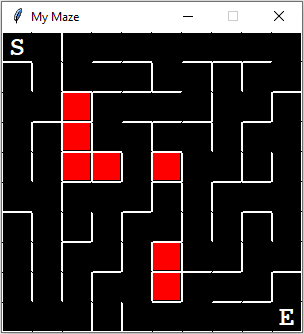
Please note, there is a bug in the code. There is a slight disconnect where walls meet. If possible, fix it.