Use graphics.py for this project.
Click HERE
 for more information.
(download, install, documentation, ...)
for more information.
(download, install, documentation, ...)
Project #1
Create one (or more) functions that draw the polygons in
the table below. (See the code hint.)
Polygons are drawn around a center point.
The center point can be any point within the
graphics window.
A scale factor determines the size of the polygon to draw.
Project #2
Create an interactive program that allows a user
to specify the type, location, and size of the polygon
to draw.
Project #3
Create drawing functions that can draw polygons that
are rotated around the Z axis.
Polygons
| Regular Polygons |
|---|
| Name | Number of
Edges |
Interior Angle | Sum of
Interior Angles |
Length
of Edge |
|---|
| Triangle |
3 |
60° |
180° |
1.0 |
| Quadrilateral |
4 |
90° |
360° |
1.0 |
| Pentagon |
5 |
108° |
540° |
1.0 |
| Hexagon |
6 |
120° |
720° |
1.0 |
Heptagon
(or Septagon) |
7 |
128.5714...° |
900° |
1.0 |
| Octagon |
8 |
135° |
1080° |
1.0 |
Nonagon
(or Enneagon) |
9 |
140° |
1260° |
1.0 |
| Decagon |
10 |
144° |
1440° |
1.0 |
Hendecagon
(or Undecagon) |
11 |
147.2727...° |
1620° |
1.0 |
| Dodecagon |
12 |
150° |
1800° |
1.0 |
A polygon is:
- Convex if any line drawn through the polygon
meets its boundary exactly twice. (All interior
angles are less than 180°.)
- Equiangular if all corner angles are equal.
- Equilateral if all edges are the same length.
- Regular if both Equilateral and Equiangular.
The sum of the interior angles of a polygon with n
edges is calculated using the formula
(n-2) x 180°.
For a regular polygon (where all edges and angles
are equal), each individual interior angle is
calculated by dividing the total sum by the number
of edges ((n-2) x 180°)/n.
Links
Regular Polygon
(Wikipedia)
Code Hint
# ==============================================================
# points that define a regular hexagon
# edges that define a regular hexagon
#
# p1
# . .
# upper-left . . upper-right
# . .
# p6 p2
# . .
# left . p0 . right
# . .
# p5 p3
# . .
# lower-left . . lower-right
# . .
# p4
#
# --------------------------------------------------------------
#
# Cartesian Coordinate System Graphics Window Coordinates
# (viewer is at +z infinity) (viewer is at +z infinity)
#
# +y (0,0)
# | +------------- +x
# | |
# | |
# | |
# | |
# +------------- +x +y
# (0,0)
#
# ==============================================================
# --------------------------------------------------------------
# ---- create/draw a hexagon graphics-object
# ---- draw a hexagon around a center point scaled up
# ---- note: coordinates are graphics window coordinates
# --------------------------------------------------------------
import graphics as gr
def draw_hexagram(win:gr.GraphWin,
center_point:tuple[int|float,int|float],
scale:int|float,
outline_width:int=2,
fill_color:str|None=None,
outline_color:str='black'):
# ------------------------------------------------------
# ---- add code here to calculate the polygon's corner
# ---- points (p1,p2,..,p6)
# ---- note: coordinates are graphics window coordinates
# ------------------------------------------------------
hobj = gr.Polygon(gr.Point(p1[0],p1[1]),
gr.Point(p2[0],p2[1]),
gr.Point(p3[0],p3[1]),
gr.Point(p4[0],p4[1]),
gr.Point(p5[0],p5[1]),
gr.Point(p6[0],p6[1]))
hobj.setOutline(outline_color)
hobj.setWidth(outline_width)
if fill_color is not None: hobj.setFill(fill_color)
hobj.draw(win)
return hobj
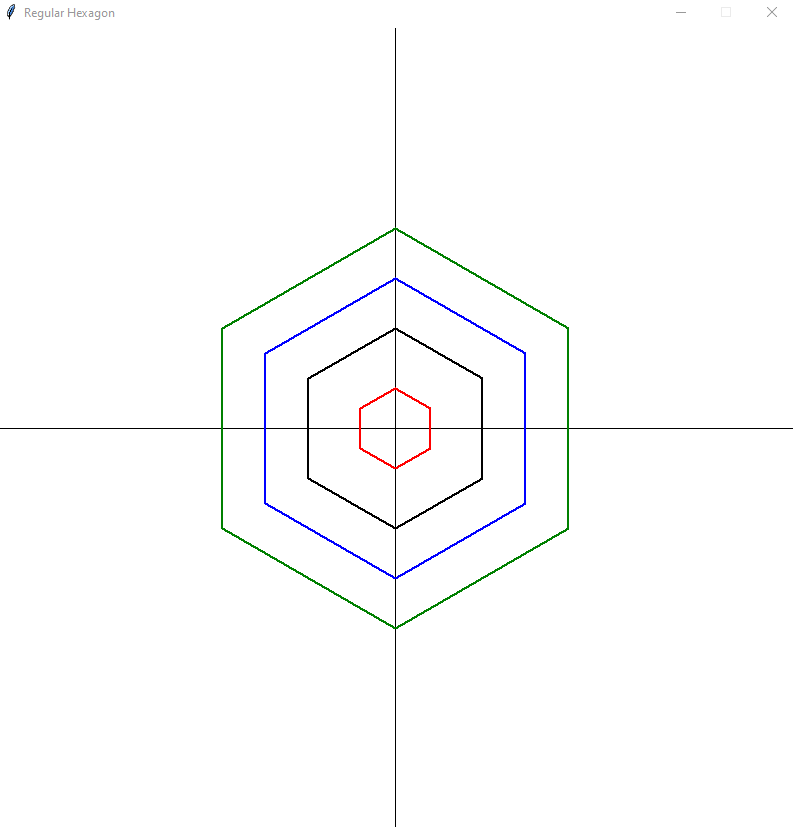
Design Thoughts
Instead of each corner point being in its own variable
(p1,p2,...), what if we put the points in a list and
pass the list to the gr.Polygon function.
This has the advantage that one function can drawing
polygons with differing numbers of edges.
# --------------------------------------------------------------
# ---- pseudo code - draw polygon
# --------------------------------------------------------------
def poly(number_of_edges,center_point=(0,0),scale_factor=100):
points = []
for _ in range(number_of_edges):
calculate point X coordinate
calculate point Y coordinate
points.append((x,y))
draw(points)